Download AI File Sorter 1.8.0
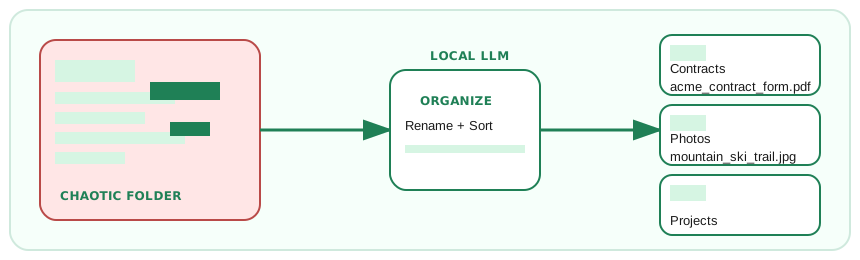
Tired of digging through cluttered folders? Let AI File Sorter handle it for you with stronger local and cloud-based AI models, screenshot-aware visual analysis, document understanding, and review-first rename suggestions.
Built in blazing-fast C++ with a modern Qt interface, AI File Sorter analyzes your files fully offline using built-in local models like Gemma 3 4B IT, Gemma 1.1 7B, and Mistral 7B - no internet required. Version 1.8.0 adds a backend status indicator, single-instance launching, smarter GPU selection, local learning from approved reviews, cache maintenance and reset tools, more interface languages, and Gemma 3 4B IT as the default visual model.
Select a folder, and the app will intelligently suggest categories and subcategories for all your files and folders. For supported picture files, it can generate visual descriptions and filename ideas with extra handling for screenshots, dashboards, forms, and other UI captures, and optionally append available image creation dates to category names. For supported documents (PDF, DOCX, XLSX, PPTX, ODT, ODS, ODP, and text formats), it can analyze content to improve naming and sorting. For supported audio/video files, it can suggest filenames using metadata. Use picture-only or document-only modes to focus runs, or start with the dry run preview to see exactly where files would move.
Choose your platform below to get started - whether you prefer cloud power or full local control, you are covered. Remote sorting uses your own OpenAI or Gemini API key or a compatible endpoint, while local text and visual models run entirely offline for privacy.
Windows 10 and higher
MacOS (Apple Silicon M2/M3/M4/M5)
If macOS blocks the app because it is not signed with an Apple certificate, follow the macOS opening steps.
MacOS (Apple Silicon M1)
If macOS blocks the app because it is not signed with an Apple certificate, follow the macOS opening steps.
MacOS (Intel CPU)
If macOS blocks the app because it is not signed with an Apple certificate, follow the macOS opening steps.
Linux Debian
Linux Ubuntu 24.04
Why Choose AI FileSorter?
-
local visual image analysis for picture files, with Gemma 3 4B IT as the default backend
The app can use local visual models to understand images, handle screenshots and UI captures more intelligently, and suggest useful categories or filenames without uploading pictures.
-
Document content analysis for PDFs, Office files, and common text formats
Instead of relying only on filenames, AI FileSorter can read supported documents to make better sorting and naming suggestions.
-
Local learning from approved reviews plus cache and reset tools
Approved category decisions can be reused as local hints in future runs, and Settings includes tools to clear caches or reset learned behavior when you want a clean slate.
-
Rename-only flows with suggested filenames and clear Renamed / Renamed & Moved status labels
Use rename-only mode when you want clearer filenames without moving files, with review labels that show exactly what changed.
-
Optional metadata-based filename suggestions for supported audio and video files
For media files, available metadata can help create more meaningful filenames before you approve the changes.
-
Picture-only or document-only processing toggles to focus runs
Limit a run to pictures or documents when you want faster, more targeted cleanup for a specific file type.
-
Optional image creation-date suffixes for time-aware categories
When image dates are available, categories can include date context so photo folders are easier to scan later.
-
System compatibility check that helps pick the best LLM for your hardware
The app checks your machine and suggests model choices that fit your available hardware instead of leaving you to guess.
-
Custom API endpoints in the LLM selector for local servers or self-hosted gateways
Point the app at your own compatible endpoint when you run models locally or through a private gateway.
-
Progress is saved as you go so long runs are resilient to interruptions
Long sorting jobs save progress during processing, reducing the risk of losing work if something interrupts the run.
-
Preview-only dry run with a From/To table so nothing moves until you say so
Review the proposed source and destination paths first, then decide whether to apply the moves.
-
Persistent Undo: revert the latest sort even after closing, thanks to saved plan files
Undo information is saved to disk, so you can revert the last applied sort even after closing the app.
-
Bring your own OpenAI or Gemini API key for remote LLMs; pick any ChatGPT or Gemini model
Use cloud models only with your own keys, giving you control over provider, model choice, and account usage.
-
Add custom local LLMs and download built-in local models in one click (Gemma 3 4B IT, Gemma 1.1 7B, Mistral 7B)
Download supported local models quickly, reuse Gemma 3 4B IT for both text and visual workflows when applicable, or connect your own local GGUF model when you want offline sorting.
-
Switch between More Refined and More Consistent categorization modes
Choose a mode that either creates more detailed categories or keeps results more predictable across similar files.
-
Whitelist categories, use model-aware category languages, and sort review items by file names, categories, or subcategories
Keep approved categories under control, use category-language options that depend on the selected local model, and organize the review table in the order that makes checking easiest.
-
More interface languages plus localized Quick Start help and an in-app FAQ link
Use localized interface text and get guided help faster with built-in Quick Start and FAQ entry points across the expanded language set.
-
GPU acceleration via CUDA, Vulkan, and Metal with smarter backend selection
Compatible NVIDIA, AMD, Intel, and Apple hardware can speed up local model processing, and recent releases improve backend choice and startup reliability.
-
Secure and private: your data stays on your machine
Local processing keeps files and model analysis on your computer unless you explicitly choose a remote provider.
-
Cross-platform and open source: available for Windows, macOS, and Linux (see GitHub)
The app is available across major desktop platforms, and the source code can be inspected or contributed to on GitHub.
Stay Updated!
Subscribe to receive updates about new features and releases of AI File Sorter.
You can unsubscribe anytime.